Name: Pages CS 15.2 v2 [EDiSO]_AppmacOs.dmg
Size: 354.93 MB
Files: Pages CS 15.2 v2 [EDiSO]_AppmacOs.dmg [354.93 MB]
Pages Creator Studio 15.2 v2 macOS
Pages Creator Studio
Create and edit documents
Pages is an Apple app that combines powerful features with ease of use. You can easily create, edit, and view any document—from reports and letters to posters and books.
Stand out from the crowd by adding beautiful images, videos, and drawings to your documents. Collaborate with others and make edits in real time.
Create stunning documents.
- Easily customize page layouts, fonts, and colors.
- Add photo and video galleries, audio recordings and voice notes.
- Use powerful graphics tools like masks and instant background removal.
Convenient work with text.
- Easily insert and customize charts, tables, and shapes.
- Use special built-in styles and formatting tools to create outlines, tables of contents, and bibliographies.
- •Automatically organize lists, text, and nested objects.
What’s New:
Version 15.1
Pages is now part of Apple Creator Studio, an amazing collection of Apple’s most powerful creative apps designed to help you bring your ideas to life. The suite includes Final Cut Pro, Logic Pro, Pixelmator Pro, Motion, Compressor, and MainStage – plus premium content and intelligence features* in Keynote, Pages, Numbers, and Freeform**, all in one simple plan. Creating, viewing, and editing documents in
Pages, as well as collaborating with others in real-time, does not require a subscription.
For Apple Creator Studio Subscribers:
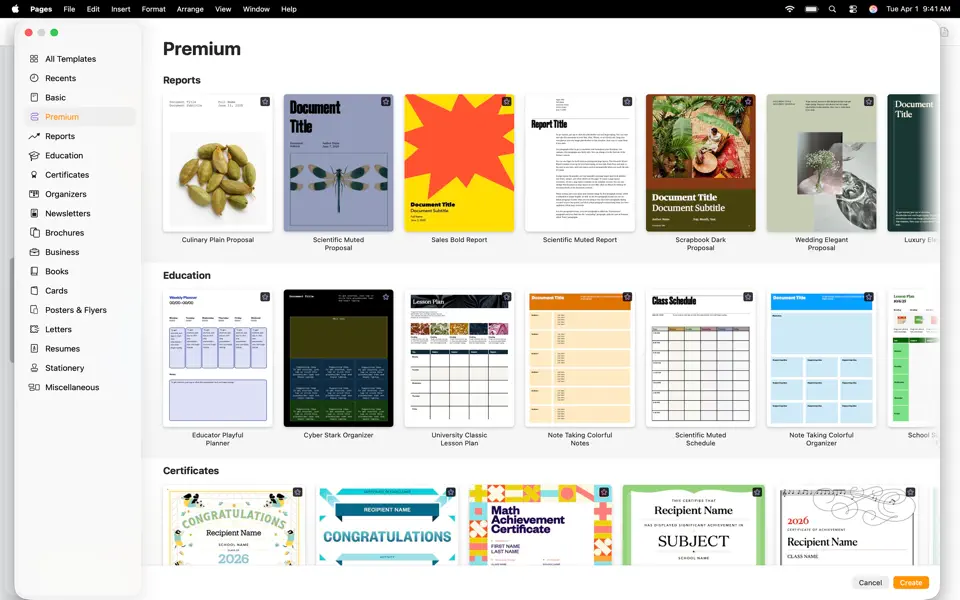
- Make your work stand out with an exclusive new collection of professionally-designed templates
- Explore high-quality photos, graphics, and illustrations for your document in the all-new Content Hub
- Find inspiration faster with collections of new Apple-curated content in the Content Hub
- Create stunning images and graphics right in your document, apply quick edits, or adjust the style using Al
- Increase the clarity and detail of existing images and graphics using Super
Resolution
- Use Auto Crop to generate suggestions for how to frame your image
- Collaborate on larger files shared via iCloud-now up to 4GB
Other New Features:
- Experience a new, more fluid way to work on your documents with Liquid Glass
- Access the full set of advanced options and controls right from the new menu bar in iPadOS 26
- Add personality to your work with new editable shapes
Compatibility: macOS 15.6 or later
Homepage https://apps.apple.com/us/app/pages-create-documents/id361309726
Screenshots