Dato 5.8.0 for Mac
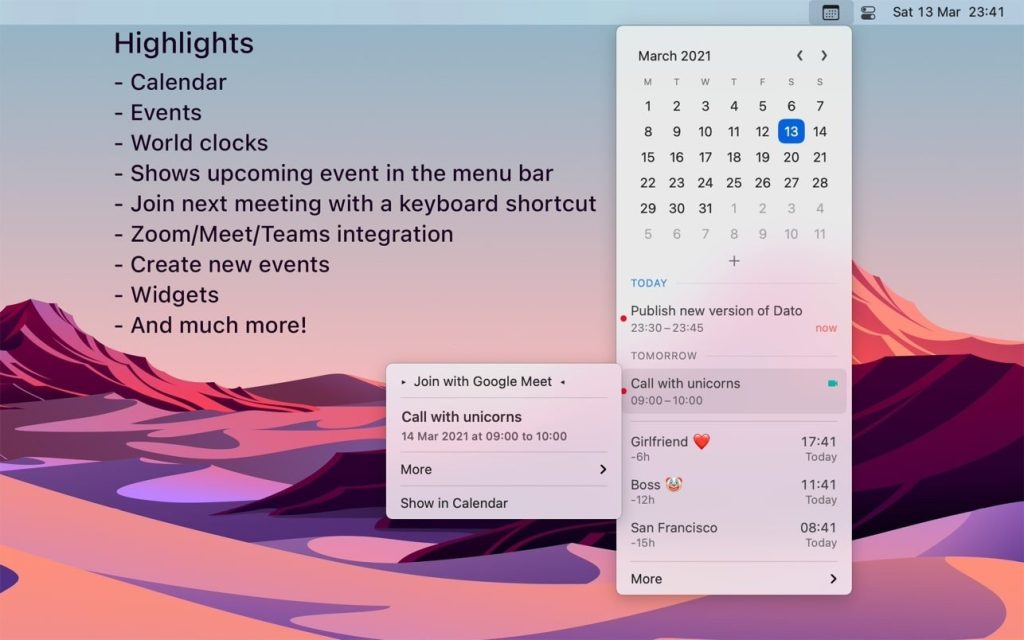
Dato gives you a local clock, the date, several world clocks, and upcoming events in the menu bar. When you click Dato in the menu bar, you get a menu with a calendar, calendar events, and a world clock. All of this is easily customizable.
A one-time purchase with free updates forever. Dato will never be a subscription-based product.
Dato supports all locales and languages that macOS supports for text, date, time, and calendar in the menu bar, but the menus and settings are only available in English.
Note for Chinese users:
■ Features
A quick overview of your upcoming events
- – Customize how many events to show and for how many days
- – Supports notes in HTML format.
- – Quickly display the event in the default calendar app
Calendar
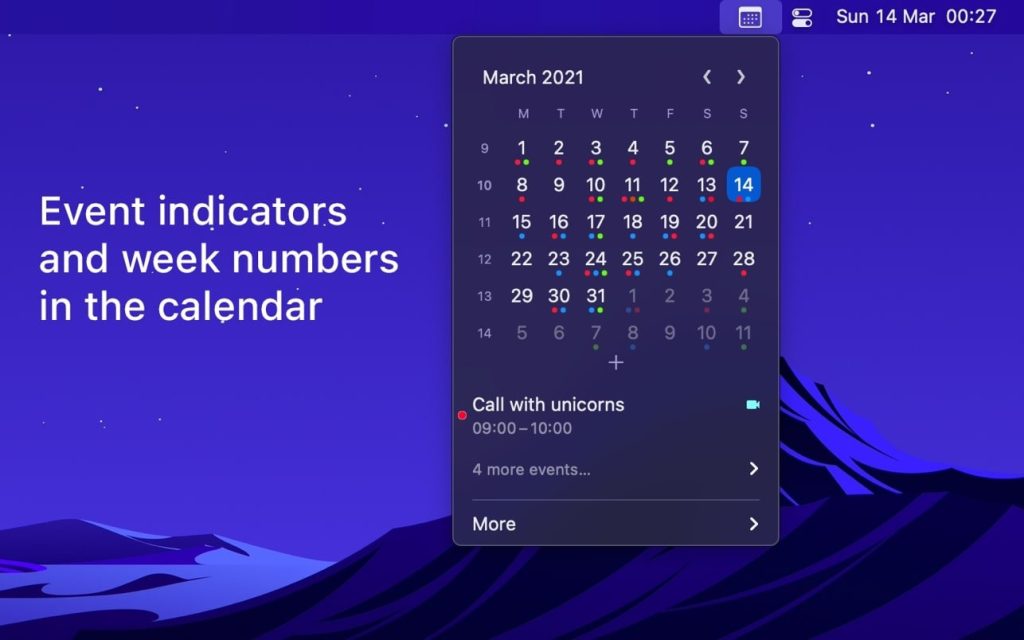
- – Week numbers
- – Event indicators
- – Highlighting specific days of the week
World clock
- – Displayed either in the Dato menu or in the menu bar
- – Custom names
- – Search in 15k cities offline
- – Time travel (see Future / Past)
And much more!
- – Show upcoming event in menu bar (e.g. Fantastical, Meeter and MeetingBar)
- – Join your next meeting (Zoom/Meet/Teams) with a customizable global keyboard shortcut
- – Create events (even with a global keyboard shortcut)
- – Supports all calendar services that macOS supports (iCloud, Google, Outlook, etc.)
- – Custom date and time format in the menu bar
- – Zoom, Google Meet, and Microsoft Teams integration (shows an icon on events and a button to quickly join)
- – Lots of menu bar icons to choose from (e.g. calendar date, like Itsycal)
- – Widgets: date and time, calendar and world clock.
- – Show seconds in the clock menu bar or in the menu
- – Global keyboard shortcut for opening/closing the application
- – Lots of hotkeys in the application for advanced users
- – Open calendar events from Google Calendar directly in Google Calendar on the web
- – Custom color of date and time in menu bar.
- – Shortcut support.
- – Hourly signal
- – Large text mode
- – Delegated calendars
- – Date and time calculator
- – Fully customizable
■ Tips
- – Click the month and year label on the calendar (e.g. “April 2020”) to change the selected day to “today”.
- – Long press a day in the calendar to open that day in your default calendar app (supports: Calendar, Fantastical 2, BusyCal, Outlook)
- – Press the arrow keys to change days on the calendar
- – Press the space bar to select today’s day in the calendar.
- – Swipe two fingers across the calendar to change months, or press the left/right arrow keys while holding the Options key.
- – Press the left/right arrow keys while holding down the shift and option keys to change years in the calendar.
- – Hold the option button while pressing the calendar arrows to move to the year instead of the month.
- – In the event details, press “command + c” to copy the selected text.
■ FAQ
〉How can I switch AM/PM time?
Dato adheres to what you set in System Preferences › Language & Region .
〉 Can you add support for Google Calendar?
This is already supported. Simply add your Google calendars to the Calendar app, then enable calendars in Dato’s settings.
〉 How can I change the first day of the week?
Dato adheres to what you set in System Preferences › Language & Region .
〉 Can you translate the app into my language?
All date and time information, as well as the calendar, are adjusted to your language preferences. I have no plans to localize the app itself.
〉 I added a calendar to the Calendar app, but it doesn’t show up in Dato
You need to enable the calendar in “Data › Settings › Events”.
〉 Data is not displayed in the menu bar
When the menu bar becomes too large, macOS hides the overflowing items, which is why Dato may have been hidden. Try closing other apps in the menu bar. Unfortunately, apps can’t detect this and warn users.
App Store details
- Version: 5.8.0
- Channel: Mac App Store (MAS)
- Price: $18.00 (one-time, region may vary)
- Requires: macOS 26.0 or later
- UI language: English (menus/settings); menu bar date/time follows system locales
Compatibility: macOS 15.4 or later
Mac App Store https://apps.apple.com/app/dato/id1470584107
Screenshots