Version: 7.2 | Release: May 2026 | OS: macOS 13.0+
Darkroom 7.2 for Mac
Darkroom is a premium photo and video editor. It’s easy to use for amateur photographers, yet powerful enough for professionals.
Apple Design Award 2020 Winner
Best App of 2015 in the App Store
Available as a universal app on iPhone, iPad, and macOS Big Sur with full integration of all the latest features.
A universal and free photo editor
All the tools to bring your photos to life. Live Photos, RAW images, and portraits are available for free. Available on iPhone, iPad, and Mac!
Video editor (Darkroom+ Subscription)
Incredibly fast and easy real-time color grading. All our filters and editing tools can be applied to video, including batch processing.
Curves and Color Picker Tools (Darkroom+ Subscription)
The heart and soul of Darkroom: the most useful Curves and Color Picker tools in iOS. A beautiful combination of powerful and simple features.
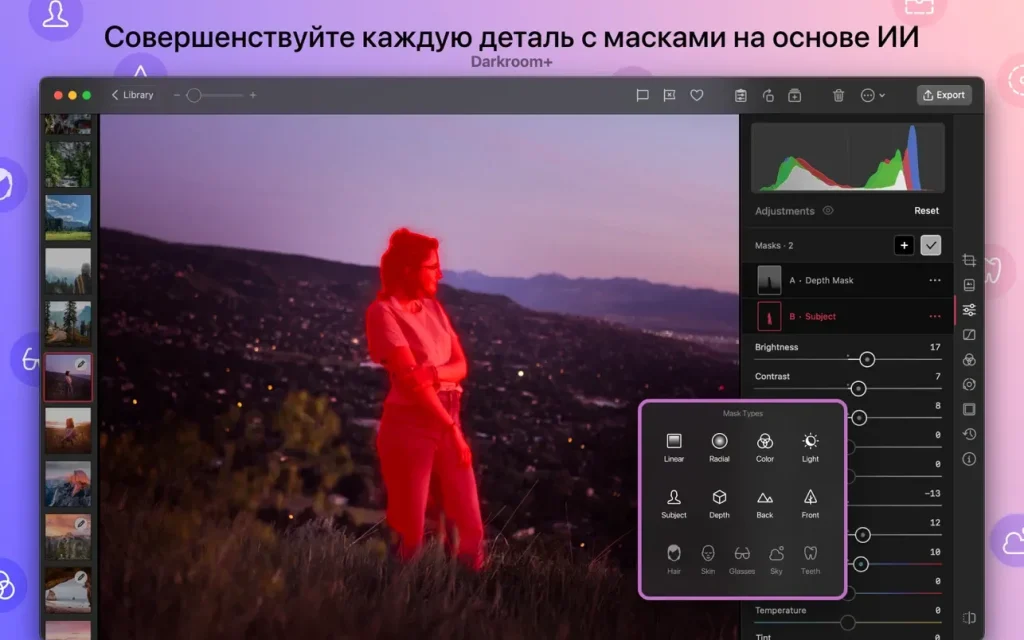
Blur in Portrait Mode
Change the foreground and background of your photos separately in Portrait mode. Adjust the blur in your portrait photos, and also change the brightness, contrast, and saturation of the foreground and background separately.
RAW editing
Edit RAW photos and restore detail in shadows and highlights.
- Comprehensive album management
- Our comprehensive suite of album management tools will help you organize your library incredibly quickly. Every action in Darkroom applies to your iCloud Photo Library!
- Create your own filters
- Use the same tools professional photographers use to create filters. Customize one of the built-in or premium filters to suit your needs, or create your own from scratch.
- No need to import
- All your photos will be imported automatically. With Darkroom, you don’t need to worry about importing.
- Batch Processing
- Apply edits and filters to multiple photos at once. Add multiple images to favorites, delete them, or hide them with a single click.
- Hashtag management and SIRI tags
- Create hashtag sets that can be exported with one tap from anywhere: the Home screen, the Today widget, the Export page, and more. Create custom Siri shortcuts to copy your favorite hashtags from any app.
Homepage https://darkroom.co/
Video Preview & Screenshots
Installation & Troubleshooting FAQ 7 questions
Common issues when installing macOS apps
How do I disable SIP and grant Terminal Full Disk Access?
System Integrity Protection (SIP) shields core macOS files from modification. Some patched apps and installers need SIP disabled temporarily.
Boot into Recovery Mode (hold Cmd+R), open Terminal from Utilities, run csrutil disable and restart.
macOS also blocks Terminal from protected folders until Full Disk Access is granted. Go to System Settings → Privacy & Security → Full Disk Access and toggle Terminal on.
How to disable Gatekeeper and remove quarantine?
Gatekeeper and quarantine can stop modified apps with “damaged” or “unidentified developer” warnings.
To disable Gatekeeper: sudo spctl --master-disable
To remove quarantine from a specific app: xattr -rd com.apple.quarantine /Applications/AppName.app
What to use instead of Launchpad on macOS 26?
Launchpad changed in macOS 26, so opening and organizing apps works differently.
Use Spotlight (Cmd+Space) to search and launch any app instantly. Third-party launchers like Alfred or Raycast are also excellent alternatives. You can also pin frequently used apps directly to your Dock for one-click access.
Why do I see security warnings when opening an app?
“App Not Downloaded from Mac App Store” — macOS blocks the app when security settings only allow App Store downloads. Go to Privacy & Security and permit apps from identified developers.
“Unidentified developer” — apps not registered with Apple trigger this on first launch. Use Control-click → Open to add a one-time security exception.
“Cannot verify for malicious software” — use Open Anyway in Privacy & Security to approve the app once.
What if the app is damaged or disk image is corrupted?
“App is damaged and can’t be opened” — quarantine flags or post-download changes trigger this error. Fix it with: xattr -cr /Applications/AppName.app
“Disk image corrupted” — incomplete or interrupted downloads often cause corrupted DMG errors. Use a download manager with resumable downloads to get a clean installer file.
How to fix Adobe app installation errors?
Adobe Creative Cloud local installers may fail from the GUI — right-click Install, open Contents/MacOS, and run the Unix executable manually to start the setup.
Adobe Error 1 (Rosetta required) appears on Apple Silicon when Rosetta is missing. Install it with: /usr/sbin/softwareupdate --install-rosetta --agree-to-license
CCXProcess install errors mean Creative Cloud cannot run Intel code on Apple Silicon without Rosetta — install Rosetta the same way, then retry.
Why can’t I install this app on an Intel Mac?
Some releases support only Apple Silicon (M1, M2, M3 and newer) and cannot install on Intel Macs due to architecture mismatch.
Look for universal builds or older releases matched to your processor. Tools like Adobe Activation Tool, QiuChenly, or RiD may offer Intel-compatible versions.
