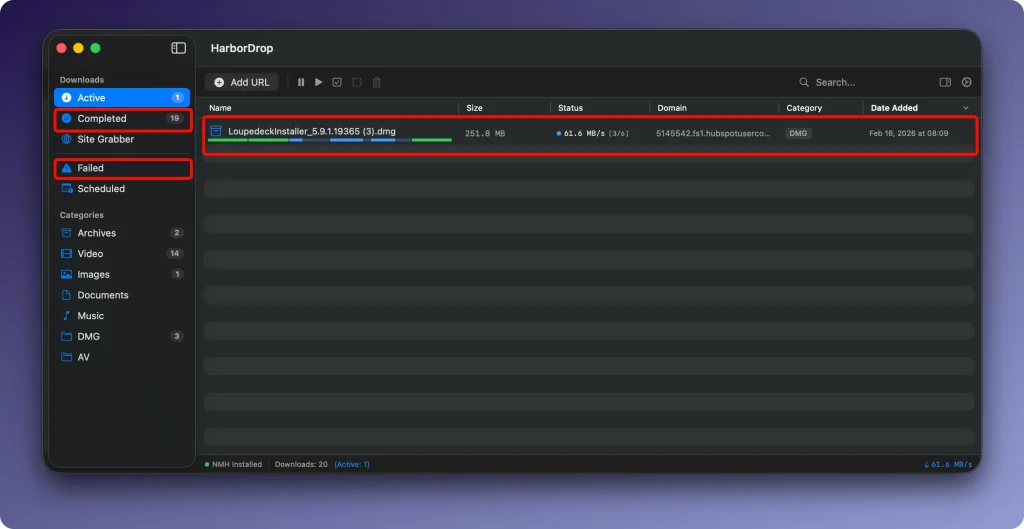
HarborDrop 1.3.0 for MacOs
HarborDrop is a download manager designed for those who find the features of a standard browser insufficient. It positions itself as a full-fledged alternative to the popular Internet Download Manager (IDM), adapted for the Apple ecosystem.
Features:
- • Accelerated downloads through segmentation: The file is split into several parts (up to 6 by default, configurable), which are downloaded in parallel. This allows for more efficient use of Internet bandwidth and significantly speeds up the download of large files.
- • Downloading HLS and m3u8 streams: The program can process video distributed via HLS streaming protocols (m3u8 playlists), which allows you to download non-DRM videos from many sites for offline viewing.
- • Browser Integration: Extension for Chrome, Edge, Brave, Arc (based on Chromium) and Firefox allows you to intercept file links, as well as all links on a page or media content, sending them directly to App.
- • Automatic sorting: You can set up rules based on the site domain or file type. Appwill automatically sort uploaded files into the correct folders.
- • Automation after download: Actions after download completion are supported: open the folder with the file in Finder, run a script (AppleScript, Shell, JavaScript) or perform any other custom action.
- • Site Grabber: A function for batch collecting and downloading all links (or according to a specified template) with a specified page depth.
What HarborDrop does
Speed & reliability:
- Multi-segment downloads — parallel connections on servers that support range requests
- Stable resume and clear progress/status for large files
- HLS / m3u8 workflows for permitted, non-DRM streaming sources
Browser integration:
- Companion extensions for Chrome, Edge, Brave, Arc, Firefox, and other Chromium browsers
- Detect media and page links; send downloads to the Mac app via Native Messaging
- Optional download interception, right-click capture, and batch “all links” picking
Organization & automation:
- Auto-categorization with domain and filename rules
- Site Grabber — batch-collect links from a site to a chosen depth
- Scheduled downloads (per official docs scope)
- Post-download actions — Finder reveal, rename scripts, AppleScript, Shell, or JavaScript
Version 1.3.0
HarborDrop 1.3.0 continues the mature download-manager workflow: segmented transfers, stream capture, browser handoff, rules, and automation. Pair the desktop app with the current browser extension for the best capture experience.
Requirements & licensing
- Version: 1.3.0
- Platform: macOS 14.0 Sonoma or later; Apple Silicon and Intel
- Browser: HarborDrop extension required for in-browser capture (desktop app is paid)
- License: one-time purchase (~$19.99); 14-day trial; no subscription
- Privacy: extension traffic stays local between browser and the HarborDrop app
Homepage: https://vesslo.top/harbordrop
Screenshots